How to Maintain your Google Business Profile

Google Business Profile can be a useful way to help customers find your farm on Google Search and Maps. Once the profile is set up, it needs a bit of attention throughout the year. Keeping your profile current helps customers know what you do, where you are, and when they can visit, and gives the best information to Google so they know when to highlight your farm business in search results.
For most farms, this periodic maintenance does not need to be complicated. A good routine is to check your profile at least quarterly and any time something important changes, such as your hours, contact information, website, or how customers can buy from you. Much of the ongoing maintenance of your Google Business Profile happens from the same dashboard. To get there, sign in to the Google account you use to manage your profile and search for your business name on Google. From there, you can ask for reviews, edit your business information, add photos and posts, and check your Performance. The layout and button names may change a little over time, but this dashboard is the main place to manage your profile.
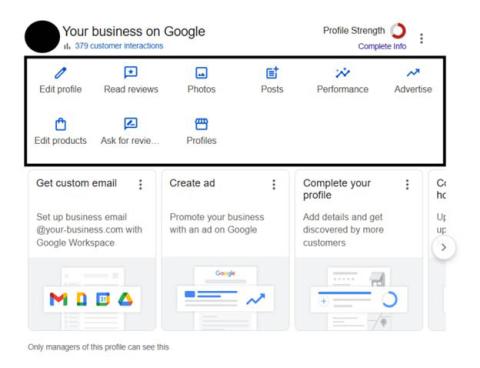
To get there, sign in to the Google account you use to manage your profile and search for your business name on Google. From there, you can ask for reviews, edit your business information, add photos and posts, and check your Performance. The layout and button names may change a little over time, but this dashboard is the main place to manage your profile.
Keep Your Business Information Up to Date
One of the most important maintenance tasks is simply keeping your profile accurate. That includes basics like your address, phone number, website, business category, and hours. From the dashboard, click Edit profile, make your changes, and save them. Depending on the type of edit, some changes appear instantly, while others may take a few days to show publicly.
For farms, hours are especially important. You can quickly lose a customer who drives to your farm only to find it closed! If your schedule changes throughout the year, update both your website and your Google Business Profile so customers don’t drive away disappointed.
Encourage & Respond to Reviews
Customer reviews matter because they help new customers decide whether to visit your farm or buy from you. Reviews give people a better sense of what to expect, whether that is the quality of your products, the customer experience, or what it is like to visit your farm. Google says more reviews and positive ratings can help your business stand out, and replying to reviews shows customers that you value their feedback.
Throughout the year, you can encourage satisfied customers to leave you reviews. To make this easier, you can share a review link or QR code that leads directly to your Google Business Profile. From your dashboard on a computer browser, select Ask for Reviews. From there, you can copy the review link or download the QR code to use in emails, signage, or printed materials. Try having a printed and laminated QR code at your farmers’ market booth or including the link in your last CSA pickup email of the season.
Be sure to ask for reviews honestly. Do not offer discounts, gifts, or other rewards in exchange for reviews, and do not pressure customers to leave only positive feedback. Both Google policy and the Federal Trade Commission rules prohibit fake, deceptive, and misleading reviews, including incentivized or paid reviews.
As reviews come in, try to respond thoughtfully to each, connecting genuinely with customers who leave positive reviews and responding constructively to negative ones. A unique response can show that you value feedback and take customer experience seriously.
Add Photos
The Photos section is a good place to keep your profile fresh throughout the year. Try adding a few fresh photos throughout the year so your profile reflects what customers will actually see when they visit. These could include your farm stand, products, staff, orchard, animals, entrance, or signage. Exterior photos can be especially helpful because they make it easier for first-time visitors to recognize where to go when they arrive.
Post Updates
The Posts tool lets you share updates with customers, such as announcements, offers, and events. Similar to social media posts, this can be a good place to share timely information such as CSA registration opening, the first week of a farmers market, pick-your-own season, holiday ordering deadlines, workshops, or on-farm events.
There is no need to post constantly, but it is worth adding a post when you have something that you want to highlight or that may be attractive to new customers.
Check Your Business Profile Performance
The Performance section helps you see how people are finding and interacting with your farm on Google Search and Maps. You can use this section to track things like profile views, search terms, website clicks, calls, and direction requests over a selected period of time. Not every metric appears for every business, but this section can still give you a useful sense of whether people are noticing your profile and taking action after they find it.
Looking at this information from time to time can help you spot patterns, such as more direction requests during farm stand season, more website clicks when CSA registration opens, or changes in the search terms people use to find your farm. That can help you decide what information to update, what to emphasize, and what customers seem to care about most.
A Simple Maintenance Routine for Farms
If you want to keep this manageable, start with a simple routine:
- Review your hours and contact info whenever your schedule changes
- Respond to new reviews
- Add a few fresh photos during each season
- Create a post when you have something timely to share, such as a seasonal opening, event, or other announcement
- Check performance every few months to see how customers are finding and interacting with your profile
Keeping your Google Business Profile up to date does not need to take a lot of time. A little maintenance throughout the year can make it easier for customers to find your farm, trust the information they see, and decide to visit or buy from you.
Extension Services & Tools That Help NH Farmers Grow

Newsletters: Choose from our many newsletters for production agriculture
Receive Pest Text Alerts - Text UNHIPM to (866) 645-7010
Author(s)


